.jpg)
As a freeware, Pure ink always look for supports from users. You can support this project by these three ways:
 |
 |
 |
| You can credit Pure ink by hashtab '#pureink' and '#pureinksoftware'. |
You can share your Pure ink project with us via contact@pureink.org. We love to hear about that. |
You can donate |
The latest version of Pure ink is 3.0.1
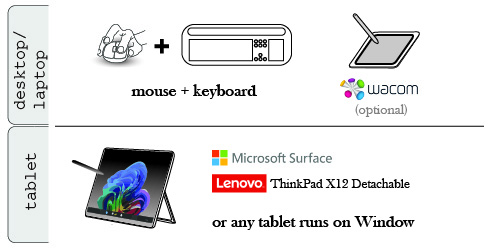
- The software can run on desktop or laptop with Window (64-bit) or Mac (Apple Silicon) installed. You can operate and draw with just a mouse and keyboard. The software also supports Wacom pressure stylus.
- For tablet, the software can operate on Microsoft Surface or any tablet running with Window, but not available for Android, iPad, or mobile phone.
- Recommended CPU (for Window) is Intel i7 or above, or other versions with equivalent performance.
- Basic requirement of RAM is 8G for project in small scale, and recommended level is 16G or above.
Installing Window version
 (930MB)
-
Download Pure ink Installer, double click it and follow the steps to install.
-
Pure ink is safely signed
. If Window SmartScreen blocks the installation, click "More info" (1) and click "Run anyway" (3) to start installation.
-
Alternatively, you can download the zip files of Pure ink. You are more likely to run the software if administrative right is required for running the installer under some situations.
unzip the downloaded file. place the folder of "Pure ink (Win64) 3-0-1" inside C:/Programe Files or in the root directory of C drive. (930MB)
- Previous version (Zip Files): Pure ink 1.5.1.
Installing Mac version
 (610MB)
-
For Mac with M1 processor or above, please use 'AppleSilicon' version. Pure ink 3.0 does not support Mac with Intel processor anymore. For Mac with Intel processor, please download 'Pure ink 1.4.2 (Mac Intel64)' in 'Previous version' below.
-
After downloading, unzip and click it to open.
-
You may need to download and install the latest Java JDK (JDK25, as of 2025) to run Pure ink. Please go to this Oracle page to download and install ARM64 DMG Installer for Mac with Apple Silicon processor. Alternatively you can directly download and install this JDK25 here.
-
Pure ink was originally developed for Windows and runs more reliably on it. We are doing our best to improve compatibility with macOS, but we cannot guarantee full stability. For safer use, we recommend that you keep only one sheet of paper open at a time while working. The Mac version does not yet support Chinese character input. To use Lanting calligraphy, please insert characters by copying and pasting them.
-
Previous version:
Pure ink 1.5.1 (Mac AppleSilicon)
Pure ink 1.4.2 (Mac Intel64)